AI redactions for controlled legal review

AI redactions for legal, DSAR and privacy review

RedactAgent is AI redaction software for teams that need more than an automatic black box. It analyses document context, stages proposed redactions, keeps reviewers in control and preserves the evidence needed to explain what happened before a production is exported.

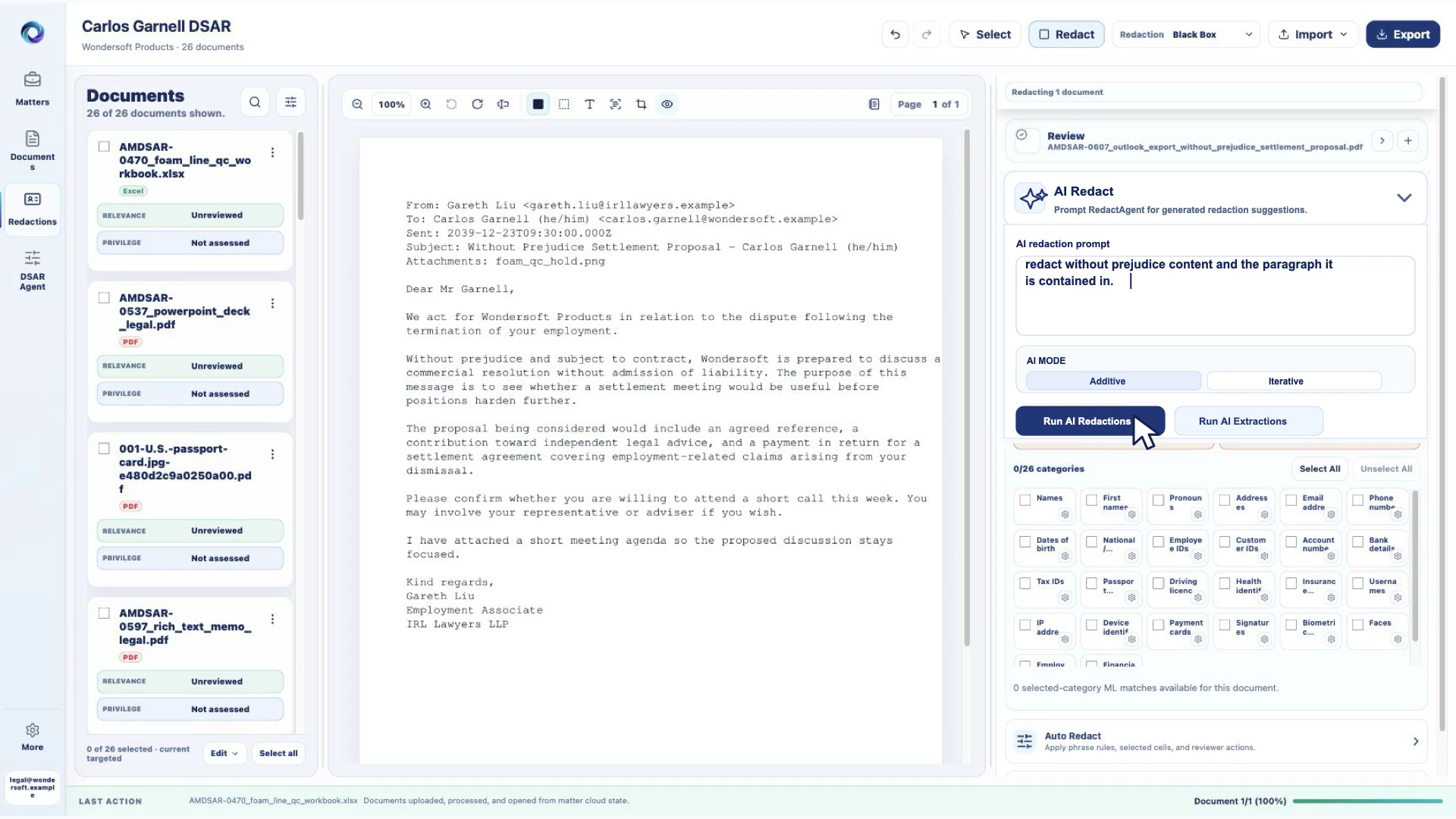
RedactAgent AI redaction prompt and review workspace using synthetic legal documents

AI redaction software should help a reviewer find sensitive material without hiding the reasoning, document context or final decision behind automation.

What are AI redactions?

AI redactions are suggested removals produced after analysing the meaning and context of a document. They can address requests that fixed patterns cannot express well—for example, finding third-party personal data, sensitive employment information, settlement terms or passages that may require privilege review.

In RedactAgent, an AI suggestion is not treated as the final legal decision. The proposed mark is staged in the review workspace so an authorised reviewer can inspect the source content, accept the suggestion, change its scope or remove it. That separation matters when confidentiality, disclosure obligations and auditability are more important than headline automation rates.

How AI redaction works in RedactAgent

The workflow keeps ingestion, AI analysis, human review and export distinct so teams can test and govern each stage.

1

Import a controlled matter

Bring PDFs, scans, images, email-derived material, office documents, spreadsheets and CSV files into a matter-based workspace. Processing exceptions remain visible instead of silently disappearing from the review population.

2

Define the review instruction

Tell the AI what should be removed or extracted using the language of the matter. Instructions can focus on personal data, confidential themes, legal advice, settlement material or a named data subject.

3

Stage proposed AI redactions

RedactAgent maps generated suggestions back to the document or spreadsheet review surface. Suggestions are candidates for review—not an invisible overwrite of the source.

4

Review and correct

Inspect every proposed removal in context. Reviewers can keep, change or remove marks and route uncertain material through the appropriate legal or privacy decision process.

5

Export defensibly

Create redacted outputs only after review. Production checks, matter history and export evidence help teams account for what was processed, what was withheld and what still requires attention.

Product walkthrough

See AI redactions move from instruction to review

This synthetic demonstration shows a reviewer entering an AI redaction instruction, running the request and reviewing the resulting marks inside RedactAgent. The workflow is intentionally visible: reviewers see the document, the instruction and the proposed redactions before production.

All public RedactAgent demonstrations use synthetic data. No customer documents are shown in website media.

Use the free redaction QA checklist when assessing the resulting production.

AI redaction workflow using the synthetic Carlos Garnell matter.

AI redaction use cases

DSAR and subject access review

Identify data about the requester, find third-party information, route potentially privileged content and prepare a reviewed disclosure set without losing document-family context.

Explore DSAR redaction software

Legal and privilege review

Stage passages involving legal advice, confidential strategy, settlement discussions or investigation material for qualified human review. RedactAgent supports the workflow but does not replace legal judgement.

Explore legal redaction software

PII and sensitive personal data

Review names, contact information, identifiers, financial references, employment information, health-related material and contextual personal data that simple pattern matching may miss.

Explore PII redaction software

PDF and scanned-document review

Work across searchable PDFs, image-derived pages and OCR-backed scans while keeping proposed redactions tied to the visible document review surface.

Explore PDF redaction software

Spreadsheet and CSV redaction

Review sensitive content with row, column, sheet and workbook context. This is important when disclosure meaning depends on adjacent cells rather than an isolated string.

Explore spreadsheet redaction

HR, investigations and compliance

Stage review of job information, absence material, disciplinary content, witness references and confidential business information before an authorised reviewer decides what should be withheld.

Explore document redaction software

Supported review surfaces

A useful AI redaction test should include the formats your team actually receives—not only clean, searchable PDFs.

ContentReview requirementRedactAgent approach
PDFs and scansMaintain page context and cover the intended content at export.Document review with native or OCR-backed text and page geometry where available.
ImagesAccount for visible text and image-based sensitive content.Image and OCR-assisted review paths with reviewer validation.
Office documentsPreserve readable content and the relationship between imported files.Controlled import and document-level review within the matter.
Spreadsheets and CSVKeep row, column, sheet and workbook meaning available.Cell-aware review, spreadsheet targeting and workbook-level context.
Email-derived materialConsider message and attachment relationships during review.Matter-based document handling with family context available to the workflow.

Why reviewer control matters

Redaction mistakes are asymmetric. A false positive may remove useful information and delay disclosure; a false negative may expose personal, privileged or confidential material. Legal AI therefore needs a workflow that supports correction, exception handling and final human accountability.

RedactAgent keeps AI assistance separate from the final production decision. This makes it possible to compare generated suggestions with the source, assess uncertain material and record what changed during review.

Security, confidentiality and AI data use

No model training on customer documents

RedactAgent does not train or fine-tune AI models on customer documents. Public demonstrations use synthetic data.

Read the AI data-use statement

Tenant-scoped review

Legal review requires controlled access and separation between customer workspaces. Procurement materials document the product's security and privacy approach.

Read security and privacy assurance

Retention and deletion controls

Teams should understand how source documents, derived content, exports and audit records are retained and removed throughout a matter lifecycle.

Read the retention and deletion policy

Evaluate before you rely

How to benchmark AI redaction software

Use a representative, versioned test set containing expected easy cases and difficult exceptions. Measure missed sensitive content, incorrect suggestions, placement accuracy, reviewer corrections, unresolved exceptions, export integrity and audit evidence separately for each document type.

A single aggregate “accuracy” percentage can conceal a complete failure on scans, spreadsheets, signatures, privilege or document families. Results should identify the corpus version, application revision, prompts, model configuration, limitations and date of the test.
AI redaction software frequently asked questions

What are AI redactions?

AI redactions are proposed removals generated from document content and review instructions. RedactAgent stages those proposals for a reviewer to inspect, change or remove before export.

Does RedactAgent automatically apply AI redactions without review?

RedactAgent stages AI suggestions for reviewer control. Teams can inspect, change, remove and audit generated redaction marks before production. Final legal and disclosure decisions remain with the reviewing team.

Can AI redaction software be used on PDFs and spreadsheets?

Yes. RedactAgent supports controlled review workflows for PDFs, scans, images, office documents, spreadsheets and CSV files. The review surface depends on the source format and available native or OCR-derived content.

Can AI redactions help with DSAR and GDPR review?

Yes. AI can help stage content involving the data subject, third parties, sensitive personal data and potentially privileged material. Reviewers remain responsible for relevance, exemptions, privilege and the final disclosure.

Does RedactAgent train AI models on customer documents?

No. RedactAgent does not train or fine-tune AI models on customer documents.

How should legal teams evaluate AI redaction software?

Use a representative, versioned test set and measure missed sensitive content, incorrect suggestions, placement, reviewer corrections, exceptions, export integrity and audit evidence by document type. Do not rely on one unsupported accuracy percentage.

Related RedactAgent resources